Padmission Inspections for NSPIRE is free to try through October 31. Sign up now to get started, see full details, and preview ongoing pricing.


Complete HQS and NSPIRE inspections, in the field.
Padmission Inspections is the NSPIRE inspection app for CoC, ESG and other HUD-funded housing programs. Everything your team needs to perform and track inspections — phone or tablet, online or offline, fully synced with Padmission Journey.
Conduct HQS or NSPIRE inspections from any device — guided for the field, not the office.
Photos, notes, and deficiencies recorded against each inspection item as you walk the unit.
Inspect units anywhere — sync once you're back in coverage. No lost work.
Results flow into RFTAs, approvals, and payments automatically. No re-entry.
Inspections shouldn't slow down housing.
In most systems, inspections live outside the core workflow — creating delays, duplicate work, and missed details. When inspections are disconnected, move-ins slow down, payments stall, and households wait longer to get housed.
Approvals move forward the same day a unit passes.
Better field data and structured deficiency capture.
Program and compliance staff see inspection status as it happens.
Every inspection tied to its tenancy — no orphaned files.
The report is written, generated, and sent before you leave the property.
Every item, photo, and comment recorded on the walkthrough compiles into a finished inspection report — delivered to the landlord, the household, and program staff while you're still in the parking lot.
-
✓
Generated from the inspection itself
No re-typing and no back-at-the-office write-up. The document is built from the items, findings, and photos captured on-site.
-
✓
Carries your organization's branding
Your logo and program details on every report that leaves the field.
-
✓
Sent to everyone in one delivery
Landlord, household, service provider, and program staff — with the 24-hour items called out at the top.
-
✓
Filed against the tenancy
The same document lands in Padmission Journey, attached to the RFTA and the audit trail.
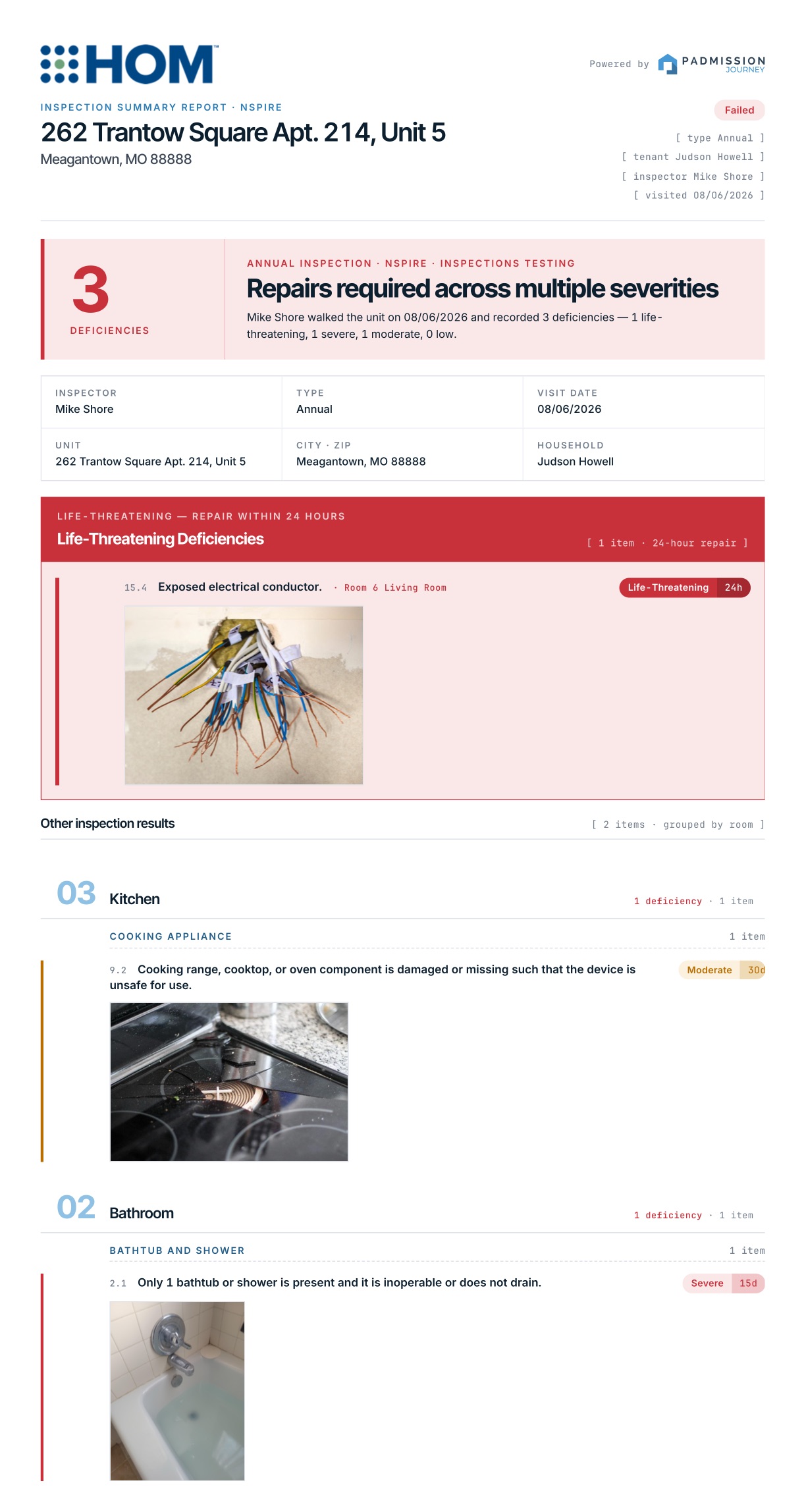
Sample NSPIRE report — life-threatening deficiencies surfaced first, remaining findings grouped by room.
From request to ready for lease-up.
Coordinated stages with clear ownership at every step of the move-in process.
RFTA in Journey kicks off an inspection record — assigned to a field user.
Date and inspector set; participant, service provider, and landlord notified.
HQS or NSPIRE walkthrough on phone or tablet, online or offline.
Deficiencies tracked through reinspection until pass.
Pass triggers downstream approvals and payments in Journey.
Designed for how inspection work actually happens.
Pull your inspection queue before heading to the property. Inspect offline — work syncs automatically when coverage returns.
Take consecutive photos of an item while voice-to-text captures your comments in real time — no switching between camera and keyboard mid-inspection.
Book a reinspection from the same screen where deficiencies are recorded — no separate scheduling step.
Send results, photos, and inspection documents before you leave the property — no back-to-office processing.
Designed for real-world program requirements.
Built around the actual standards your team is held to — not a generic checklist app retrofitted for housing.
- ✓ Supports HQS and NSPIRE inspections
- ✓ Structured deficiency tracking and documentation
- ✓ Photo capture tied directly to inspection items
- ✓ Designed for evolving standards
Standalone, or part of your system of record.
Run Inspections on its own as a field tool, whatever administers your programs. Run it connected to Padmission Journey and inspections aren't just completed — they're operationalized.
On its own
Standalone- — HQS and NSPIRE inspections on a phone or tablet
- — Works offline in the field and syncs when back in coverage
- — Finished report generated on site and sent from the parking lot
- — No change to whatever system you administer programs in
With Padmission Journey
Included- — Linked to RFTAs and tenancy workflows
- — Results flow directly into approvals and next steps
- — Complete audit trail across inspections, leasing, and payments
- — Eliminates disconnected tools and manual QA
Guided workflows.
Real-time capture.
Clear outcomes.
Built for field use, not office work — every screen designed for one-hand use while walking a unit.
Download Inspections.
Available as a stand-alone service, and included for active Padmission Journey customers. Sign up above to start a free trial, or — if your CoC already uses Journey — your administrator can grant access.
See how inspections fit into the full housing workflow.
A 60-minute walkthrough of your real workflows. See how Inspections + Padmission Journey would land in your programs and CoC.